
Home / Tools Detail

Ready to bring your project to life with precision and accuracy? Contact us today to get started with AutoCAD, and let our team provide you with the detailed designs and drawings that will guide your construction project to success.
At Prime Draft Estimates, we specialize in using AutoCAD interior design software to create accurate and detailed floor plans for residential, commercial, and industrial spaces. With AutoCAD, designers and architects can visualize and design interiors with precision, ensuring every project is executed seamlessly.
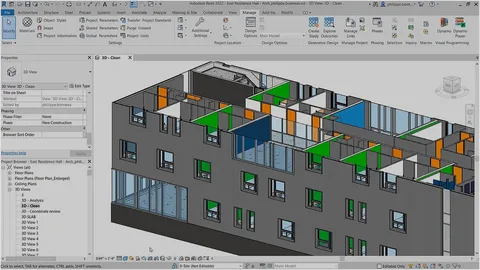
AutoCAD is a leading software used by architects, engineers, and interior designers to draft precise 2D and 3D floor plans. AutoCAD interior design software enhances the design process by providing powerful tools for creating, modifying, and analyzing floor plans, layouts, and interior details. Its intuitive interface and advanced features make it the go-to tool for interior designers worldwide.
AutoCAD provides a versatile set of tools for both 2D and 3D drafting, allowing interior designers to create precise floor plans and visualize the final layout in three dimensions.
With AutoCAD’s high level of precision, designers can create floor plans with exact measurements, ensuring accuracy in every detail. This feature is critical for avoiding costly mistakes during the construction phase.
AutoCAD allows users to work with layers to organize and separate different elements of the design. This feature simplifies editing and enhances workflow, making it easier to manage complex interior designs.
Designers can create and store custom design elements like walls, doors, windows, and furniture, saving time and maintaining consistency across projects.
With AutoCAD’s 3D modeling features, interior designers can create realistic visualizations of spaces, giving clients a clear view of the final design before construction begins.
AutoCAD’s cloud-based features allow for real-time collaboration among team members, architects, and clients, ensuring everyone is aligned on the design vision and making adjustments easier.
Enhanced Design Accuracy
Using AutoCAD interior design software ensures every element of the interior design is accurately represented, reducing the risk of errors and rework during construction.
Efficient Workflow
AutoCAD’s tools and features allow for faster and more efficient design processes. With its customizable options and ability to reuse design components, interior designers can streamline their workflow and meet tight project deadlines.
Improved Client Communication
The ability to create 3D renderings and detailed floor plans helps designers communicate their vision clearly to clients, ensuring that all expectations are met before construction begins.
Cost-Effective Design
By creating accurate floor plans and eliminating the need for revisions, AutoCAD helps designers avoid costly mistakes and improve cost efficiency in the overall design process.
Industry Standard
AutoCAD is the industry standard for interior design software, trusted by professionals worldwide. Its comprehensive set of tools ensures that designers can handle any project, regardless of complexity.
AutoCAD interior design software enhances accuracy, efficiency, and communication, helping interior designers create detailed floor plans and 3D models with ease.
AutoCAD’s cloud-based tools allow multiple team members to work on the same project simultaneously, ensuring real-time collaboration and smoother project execution.
Yes, AutoCAD interior design software is versatile and can be used for designing both residential and commercial spaces, offering precise tools for a wide range of projects.
AutoCAD allows designers to create 3D models of interior spaces, providing a realistic visualization that helps clients understand the final design and make informed decisions.
AutoCAD is user-friendly, with numerous tutorials and resources available to help new designers quickly get up to speed. Its intuitive interface and customizable features make it accessible for all skill levels.