Home / Tools Detail

Ready to bring your vision to life with precision and efficiency? Contact us today to start your project using ArchiCAD, and let our team provide you with detailed, high-quality designs that ensure your project is built to perfection.
At Prime Draft Estimates, we specialize in using ArchiCAD software to create accurate and innovative architectural designs. Whether you’re working on residential, commercial, or industrial projects, ArchiCAD’s powerful features help architects and designers streamline their workflows and produce high-quality results.
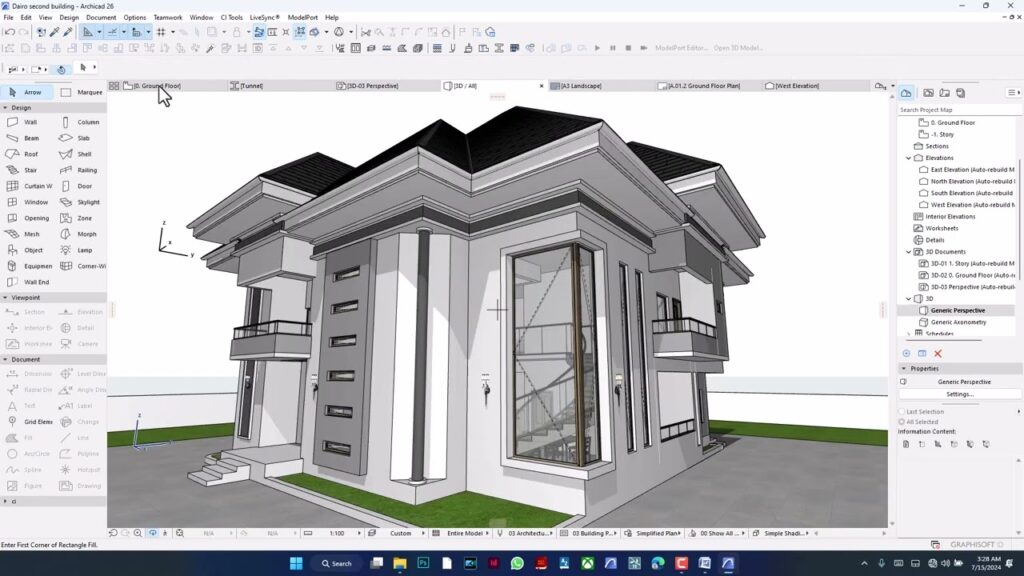
ArchiCAD is an advanced architectural design software that enables architects to create, visualize, and manage building designs through a comprehensive Building Information Modeling (BIM) platform. Known for its intuitive interface and robust set of tools, ArchiCAD allows users to design everything from simple layouts to complex structures in 2D and 3D, ensuring every project is delivered with precision.
ArchiCAD integrates all aspects of a building’s design — including architecture, structure, and MEP (mechanical, electrical, plumbing) — into a single platform. This makes collaboration seamless between different teams and ensures all design components work together.
ArchiCAD’s 3D modeling tools allow architects to create detailed, realistic visualizations of their designs. By generating 3D models early in the process, designers can identify potential issues and make adjustments before construction begins.
ArchiCAD features parametric design tools that allow for the creation of highly customizable building elements. These tools enable architects to modify elements quickly, ensuring flexibility and efficiency throughout the design process.
ArchiCAD enables real-time collaboration among architects, engineers, and contractors. With its cloud-based features, multiple users can work on the same project simultaneously, streamlining the design process and ensuring everyone is aligned.
ArchiCAD generates accurate construction documents directly from the 3D model. This includes floor plans, elevations, sections, and schedules, all updated automatically as changes are made. This reduces the risk of errors and inconsistencies in project documentation.
ArchiCAD includes tools that help architects design energy-efficient buildings. With integrated energy analysis, users can assess the building’s performance and make adjustments to improve sustainability and reduce operational costs.
Streamlined Design Process
With ArchiCAD software, architects can work more efficiently by utilizing powerful tools for both 2D and 3D design. From creating initial sketches to generating detailed drawings, ArchiCAD simplifies every stage of the design process.
Improved Collaboration
ArchiCAD’s cloud-based collaboration tools ensure smooth communication between all team members. Real-time updates and version control allow everyone to stay on the same page, reducing miscommunication and errors.
Precision and Accuracy
By using ArchiCAD software, you can ensure that your designs are accurate and up to code. The software’s parametric modeling and real-time documentation tools allow for precise measurements and detailed plans that eliminate costly mistakes during construction.
Cost Efficiency
ArchiCAD helps architects identify potential issues early in the design phase, reducing the need for costly revisions during construction. By automating documentation and improving collaboration, ArchiCAD helps save time and reduce overall project costs.
Enhanced Visualization
The 3D modeling and visualization tools in ArchiCAD allow clients to better understand the design before work begins. Detailed 3D renderings provide a clear picture of the final result, making it easier to secure approvals and make design decisions.
ArchiCAD offers a complete BIM platform, allowing architects to design, visualize, and manage every aspect of a building’s design from start to finish. Its seamless integration of design, structure, and documentation makes it an essential tool for architects.
ArchiCAD’s cloud-based collaboration tools allow multiple users to work on the same model in real-time, ensuring everyone is aligned on the project’s vision and updates.
Yes, ArchiCAD software is versatile and can be used for a wide range of architectural projects, from small residential homes to large-scale commercial buildings.
ArchiCAD’s parametric design tools and real-time documentation features ensure that all designs are accurate and up-to-date, reducing the risk of errors during construction.
Yes, ArchiCAD software includes tools for energy analysis and sustainability assessments, helping architects design energy-efficient buildings that meet green building standards.